FloodVision: Visuals for coastal flooding events
Photorealistic visuals to support precise, responsible storm surge communication
When a major coastal storm is approaching, people need to understand what’s at stake — and see what storm surge flooding could look like for their homes, workplaces, and communities. Climate Central’s FloodVision® provides photorealistic, street-level visuals that help people imagine the risk.
This page is designed for media professionals, public officials, and other communicators seeking to access and responsibly use FloodVision visuals to inform the public and motivate timely action before storms.

How FloodVision supports storm communication
When a coastal storm is forecasted, storm surge information from the National Hurricane Center (NHC) becomes a key reference point for communicating local flood risk.
The NHC communicates storm surge as inundation above ground level (i.e., the depth of flooding that people could experience where they are). FloodVision uses a similar reference point. It models flood depths above road level — a consistent and visible anchor in each scene — to generate photorealistic visualizations that show how flooding could appear across the terrain in real-world settings. This approach helps improve clarity and public understanding.
FloodVision uses stereoscopic street-level video, LiDAR, and GPS to estimate the elevation of every pixel. Using this data, AI generates photorealistic visuals showing projected floodwater depths at any given location.
There are FloodVision visuals for hundreds of coastal communities along the East and Gulf Coasts.
How to access and use FloodVision visuals
1. Identify key locations at risk based on official storm surge forecasts
When the National Hurricane Center (NHC) issues a forecast for storm surge inundation (e.g., “3 to 6 feet above ground level”), they will provide a storm surge map that’s similar to the one shown here. Use this map to identify areas within your region that are projected to flood. Determine which neighborhoods, intersections, landmarks, or evacuation routes are relevant to your reporting or public messaging.

2. Request curated visuals from Climate Central
Contact us (info@climatecentral.org) to request custom FloodVision visuals for your reporting or audience. If visuals are available for your coastal location, we can provide a curated set of visuals based on the NHC forecast and your needs. While our RiskViewer includes example visuals, we recommend requesting curated sets aligned with the current storm threat.


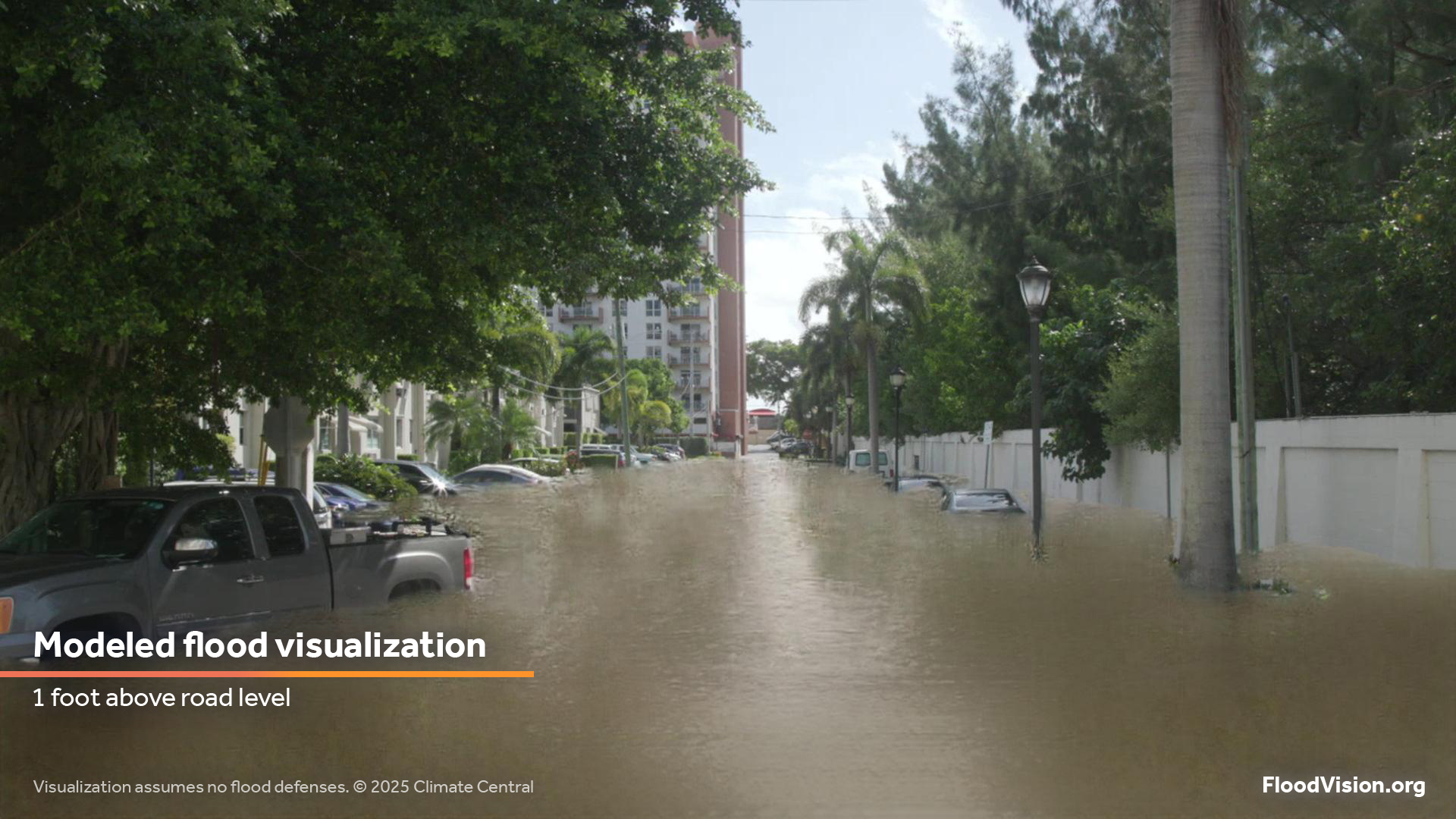
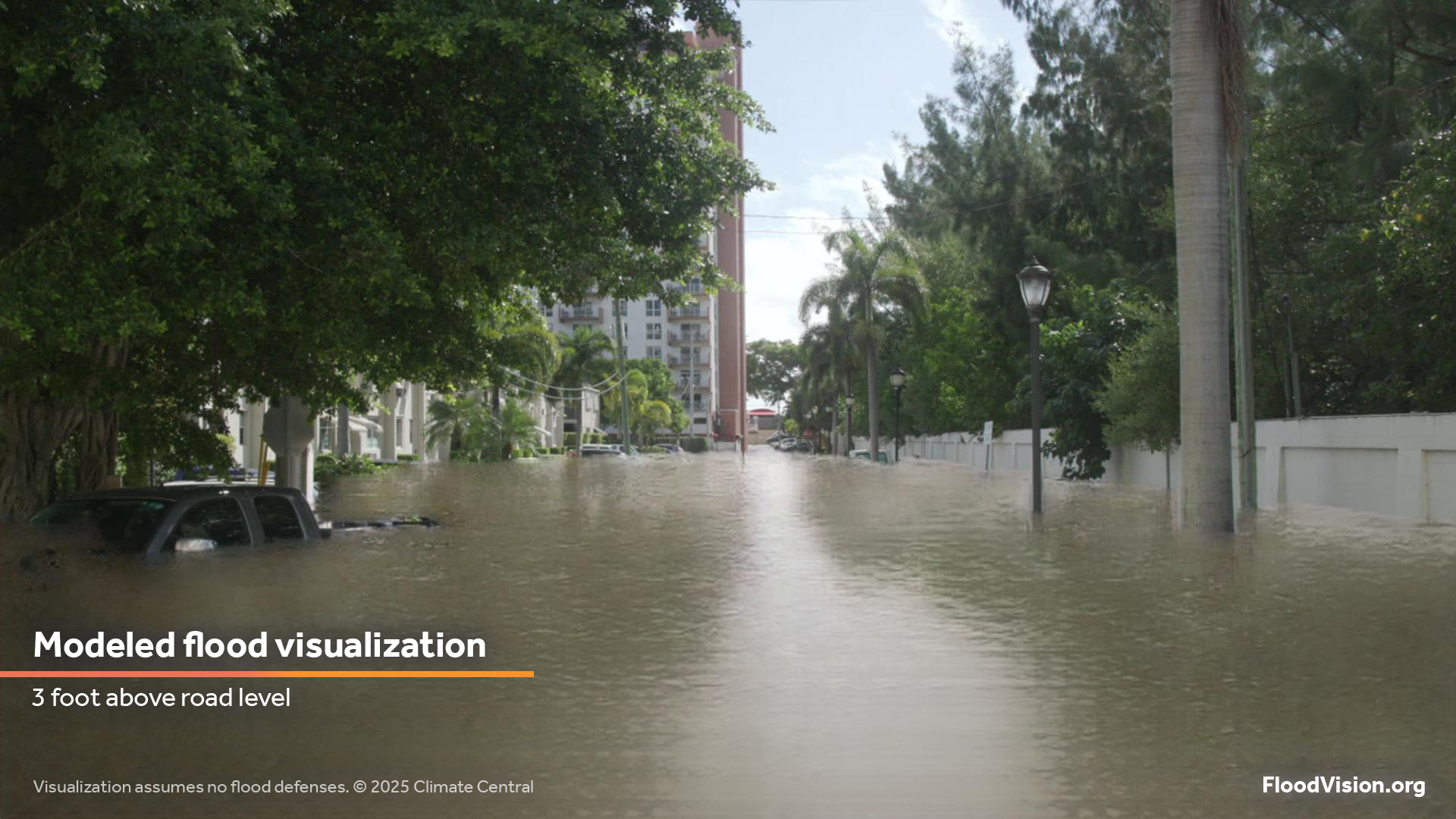
3. Use these visuals to help inform and protect
Use FloodVision visuals in articles, broadcasts, social posts, or alerts to:
Visualize impacts to specific types of places, such as schools, emergency rooms, municipal buildings, or evacuation routes, to create more relatable, localized narratives.
Support official government evacuation messaging and preparedness efforts, when appropriate, to help people understand why preparing for an upcoming storm may be necessary.
Build public trust in data-driven reporting by showing realistic, science-based images instead of abstract maps.
Contribute to post-event storytelling by using “what if” visuals to illustrate near-miss scenarios. This could include, for example, showing how six feet of storm surge that occurred in Texas would look in your community in Florida or North Carolina, as part of a preparedness campaign.
For planning, not just response
FloodVision visuals aren’t just useful in the moment — they can also play a critical role in long-term resilience planning. Public officials can use them to apply for state and federal funding, target repetitive loss areas, promote flood insurance uptake, and support planning and zoning decisions. The visuals help illustrate flood risk for critical facilities like schools, hospitals, and evacuation routes, and can strengthen interagency coordination, public outreach, and community engagement around preparedness and adaptation.
Request custom visuals by emailing us at info@climatecentral.org.
Best practices for using FloodVision
To ensure accurate and responsible use, follow these key guidelines.
Always include the label provided with the visualization, noting it is a “modeled flood visualization,” along with the specific scenario used (e.g., storm surge level and/or sea level rise).
Always credit Climate Central FloodVisionⓇ.
When sharing visuals on social media, link back to: https://www.climatecentral.org/tools/floodvision-riskviewer.
Provide context to explain what the visualization shows and how it was generated.
FloodVision visuals should not replace official guidance from NHC or state or local government officials.